Free IndexNow for Shopify: Step-by-Step Guide (No Apps)

Shopify doesn't support IndexNow natively. Store owners who want faster indexing on Bing, Yandex, and AI search tools like ChatGPT are stuck paying $5/month for apps that do something the protocol was designed to be free.
Here's the $0 alternative using a free Ahrefs account and our IndexNow submission tool.
Why IndexNow Matters for Ecommerce?
IndexNow is a protocol that lets you notify search engines the moment you publish or update content. Instead of waiting days or weeks for crawlers to discover changes, search engines get pinged instantly.
For Shopify stores, this matters in three scenarios:
Product launches and restocks. New products sitting unindexed can't generate organic traffic. During high-demand drops, every hour of invisibility costs sales.
Price changes and promotions. You update pricing for a flash sale, but Bing still shows the old price in search results for a week. Customers click expecting a deal and bounce when they see full price.
AI search visibility. ChatGPT and Bing Chat pull from Bing's index. If your product pages aren't freshly indexed, AI tools serve outdated information—or skip your store entirely.
IndexNow currently works with Bing, Yandex, Naver, Seznam, and Yep (Ahrefs' search engine). Google hasn't adopted the protocol, so you'll still need traditional indexing methods for Google Search.
Shopify's IndexNow Problem
The IndexNow protocol requires two things:
- A verification key file hosted at your domain's root (e.g.,
yourstore.com/keyfile.txt) - An API call to submit URLs
Shopify blocks both. You can't upload files to the root directory, and there's no native IndexNow integration. This creates a gap that app developers filled with paid solutions.
The Paid App Landscape
| App | Price | Annual Cost |
|---|---|---|
| IndexNow: for Bing and Yandex (StoreSpark) | $5/month | $60/year |
| InstaIndex (klipp.tech) | From $1/month | $12-60/year |
| IndexNow: Real-Time Indexing (Monster Plugins) | $5/month | $60/year |
These apps work. They automate submissions when you update products and handle the verification key. But paying $60/year for functionality that's free on WordPress, Wix, and WooCommerce feels like a Shopify tax.
The Shopify community thread on this topic shows years of frustration. Users have requested native support, explored Cloudflare workarounds and other creative solutions
The Free Method: Ahrefs + Clean Commit IndexNow Tool
Here's how to get IndexNow working on Shopify without monthly fees.
Step 1: Set Up Your IndexNow Verification Key
IndexNow requires a text file containing your API key hosted at your domain root. Shopify doesn't allow root file uploads, but there's a workaround using redirects.
Generate your key: Go to IndexNow Key Generator, or generate API key directly in our tool. Save this—you'll need it for submissions.
Upload the key file to Shopify:
- In Shopify Admin, go to Content > Files
- Upload a text file named with your API key (e.g.,
abc123def456.txt) containing just the key itself - After upload, copy the CDN URL. It will look like:
https://cdn.shopify.com/s/files/1/0613/5804/7413/files/abc123def456.txt?v=1744724680
Create the redirect:
- Go to Online Store > Navigation > URL Redirects
- Add a new redirect:
- Redirect from: your-api-key.txt i.e.
/abc123def456.txt - Redirect to: the file path in the store
https://www.yourstore.com/cdn/shop/files/abc123def456.txt
- Redirect from: your-api-key.txt i.e.
Now when IndexNow checks yourstore.com/abc123def456.txt, the redirect serves your key file. Verification complete.
Step 2: Find Pages That Need Indexing
You need to know which URLs aren't indexed before you can submit them. A free Ahrefs Webmaster Tools account handles this.
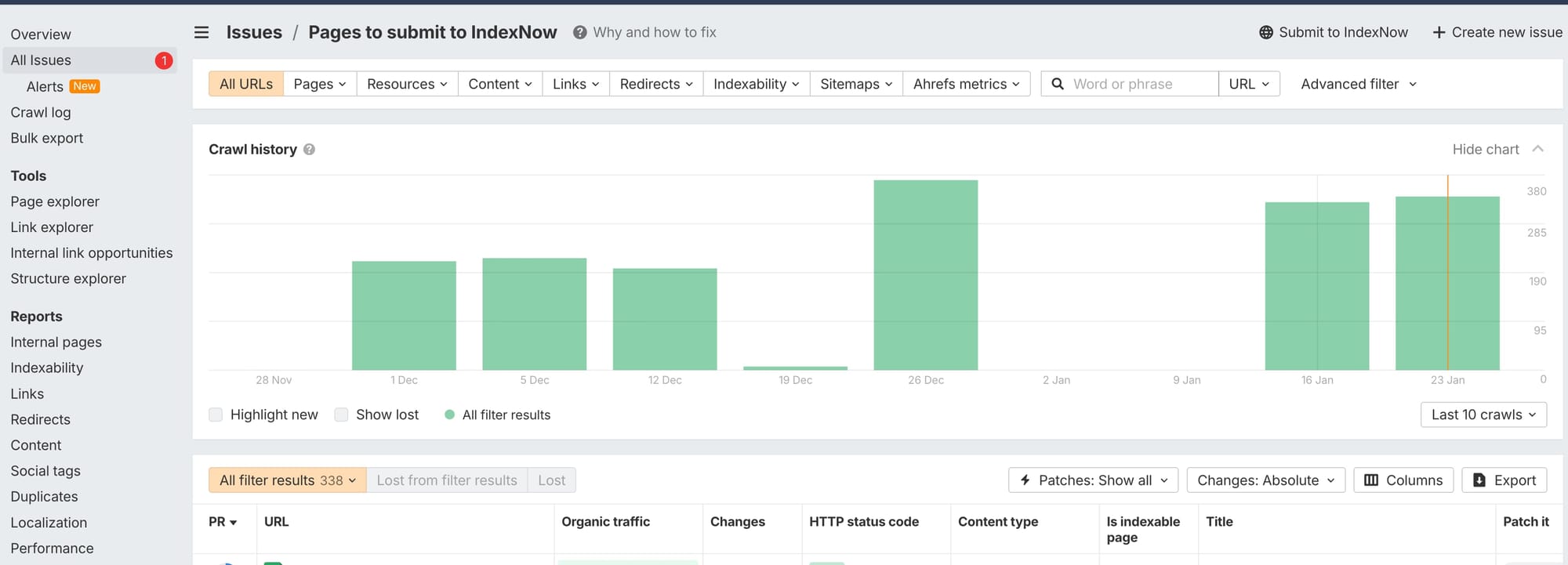
Set up Ahrefs Webmaster Tools:
- Create a free account at Ahrefs Webmaster Tools
- Verify your site ownership
- Run a Site Audit
The audit flags pages with indexing issues under the "Indexability" report.
Look for:
- Pages to submit to IndexNow
- Pages returning 200 status but not appearing in search results
- New pages that haven't been crawled yet
- Recently updated pages that need re-indexing
Export the list of URLs that need attention. Ahrefs lets you download results as CSV which you can upload directly into our tool.
Step 3: Submit URLs with Clean Commit's IndexNow Tool
This is where our free tool comes in. We built the IndexNow Submission Tool because we hit this exact problem running site audits for clients.
How to use it:
- Go to cleancommit.io/tools/indexnow
- Enter your domain and API key
- Either paste URLs directly or upload your CSV from Ahrefs
- Submit
The tool pings all IndexNow-compatible search engines simultaneously.
When to submit:
- After publishing new products or collections
- After updating pricing or product descriptions
- After publishing blog content
- After fixing technical SEO issues flagged in audits
- After deploying A/B test winners site-wide
Unlike paid apps that auto-submit on every change, this manual approach gives you control. You're not burning API quota on draft saves or minor edits, only submitting when changes are ready for indexing.
When Faster Indexing Actually Impacts Revenue?
IndexNow won't magically increase your conversion rate. But it removes friction between optimization and results.
After CRO improvements go live. You've spent weeks testing pricing strategies or optimizing product pages. Those changes only benefit organic traffic once search engines re-index. Faster indexing means faster feedback loops on what's working.
During seasonal pushes. Black Friday prep that finishes indexing in December helps no one. Submitting updated pages immediately ensures browsers pick up current pricing and availability.
For AI search capture. Bing's index powers ChatGPT's browsing feature and Microsoft Copilot. Stores with freshly indexed product data surface in AI-assisted shopping queries. Stale data means AI tools recommend competitors with current information.
The indexing speed advantage compounds when you're actively iterating. Stores running continuous A/B testing and deploying winners weekly benefit more than stores that update quarterly.
The Complete Free IndexNow Stack
Here's the full workflow at zero monthly cost:
| Task | Tool | Cost |
|---|---|---|
| Find indexing issues | Ahrefs Webmaster Tools | Free |
| Generate IndexNow key | Bing IndexNow | Free |
| Host verification key | Shopify Files + Redirect | Free (built into Shopify) |
| Submit URLs | Clean Commit IndexNow Tool | Free |
| Monitor indexing status | Bing Webmaster Tools | Free |
Total: $0/year vs $60/year for paid apps.
The tradeoff is automation. Paid apps submit automatically when you update products. The free method requires you to run submissions manually, but for most stores updating weekly or monthly, that's 5 minutes of work.
Limitations to Know
Google doesn't support IndexNow. You'll still need to submit sitemaps through Google Search Console and rely on natural crawling for Google indexing. IndexNow only accelerates Bing, Yandex, and participating engines.
Submission doesn't guarantee indexing. IndexNow notifies search engines that content changed. Whether they actually index it depends on content quality, site authority, and their own prioritization. Low-quality pages won't suddenly rank because you submitted them faster.
This won't fix crawlability issues. If pages are blocked by robots.txt, have noindex tags, or return errors, IndexNow can't help. Fix technical SEO foundations first, our 148-point Shopify audit checklist covers the basics.
Next Steps
- Set up your verification key using the Shopify Files + Redirect method above
- Run a free Ahrefs audit to identify pages with indexing issues
- Submit your first batch using our IndexNow tool
- Monitor results in Bing Webmaster Tools over the following week
If you're actively optimizing your Shopify store and want those improvements visible faster, this free stack eliminates the app tax while keeping you in control of what gets submitted.
Frequently Asked Questions
Does Shopify support IndexNow natively? No. Shopify doesn't offer built-in IndexNow support and doesn't allow file uploads to the root directory, which the protocol requires for verification. You can work around this using the Files + URL Redirect method described above, or pay for a third-party app.
Does IndexNow work with Google? No. Google has not joined the IndexNow consortium. The protocol only works with Bing, Yandex, Naver, Seznam, and Yep. For Google indexing, continue using Google Search Console and XML sitemaps.
How much do Shopify IndexNow apps cost? Most IndexNow apps for Shopify charge $1-5 per month, totaling $12-60 per year. The free method using Ahrefs Webmaster Tools and our IndexNow submission tool costs nothing.
Will IndexNow improve my search rankings? Not directly. IndexNow only speeds up how quickly search engines discover your content changes. Ranking depends on content quality, relevance, backlinks, and other SEO factors. Faster indexing means your optimizations take effect sooner, but won't boost rankings on their own.
How do I verify IndexNow is working on my Shopify store? After setting up the redirect, visit yourstore.com/your-api-key.txt in a browser. If you see your API key displayed, verification is working. You can also check submission status in Bing Webmaster Tools under the URL Inspection tool.
How often should I submit URLs to IndexNow? Submit when you make meaningful changes: new products, updated pricing, published blog posts, or deployed site-wide optimizations. Avoid submitting unchanged pages repeatedly—search engines may flag excessive submissions as spam.
Can I use IndexNow for pages that aren't indexed yet? Yes. IndexNow notifies search engines about new pages, not just updates. If you've published products that haven't been crawled yet, submitting them can accelerate initial indexing on Bing and other supported engines.


