How to Show Shipping Cost Estimates Before Checkout?

"How much is shipping?"
If you're running an ecommerce store selling furniture, appliances, or any bulky items in Australia, this question kills more sales than any other objection. The data is brutal: 48% of US online shoppers abandon their carts due to extra costs like shipping, and 41% of global shoppers cite expensive delivery fees as their primary abandonment reason.
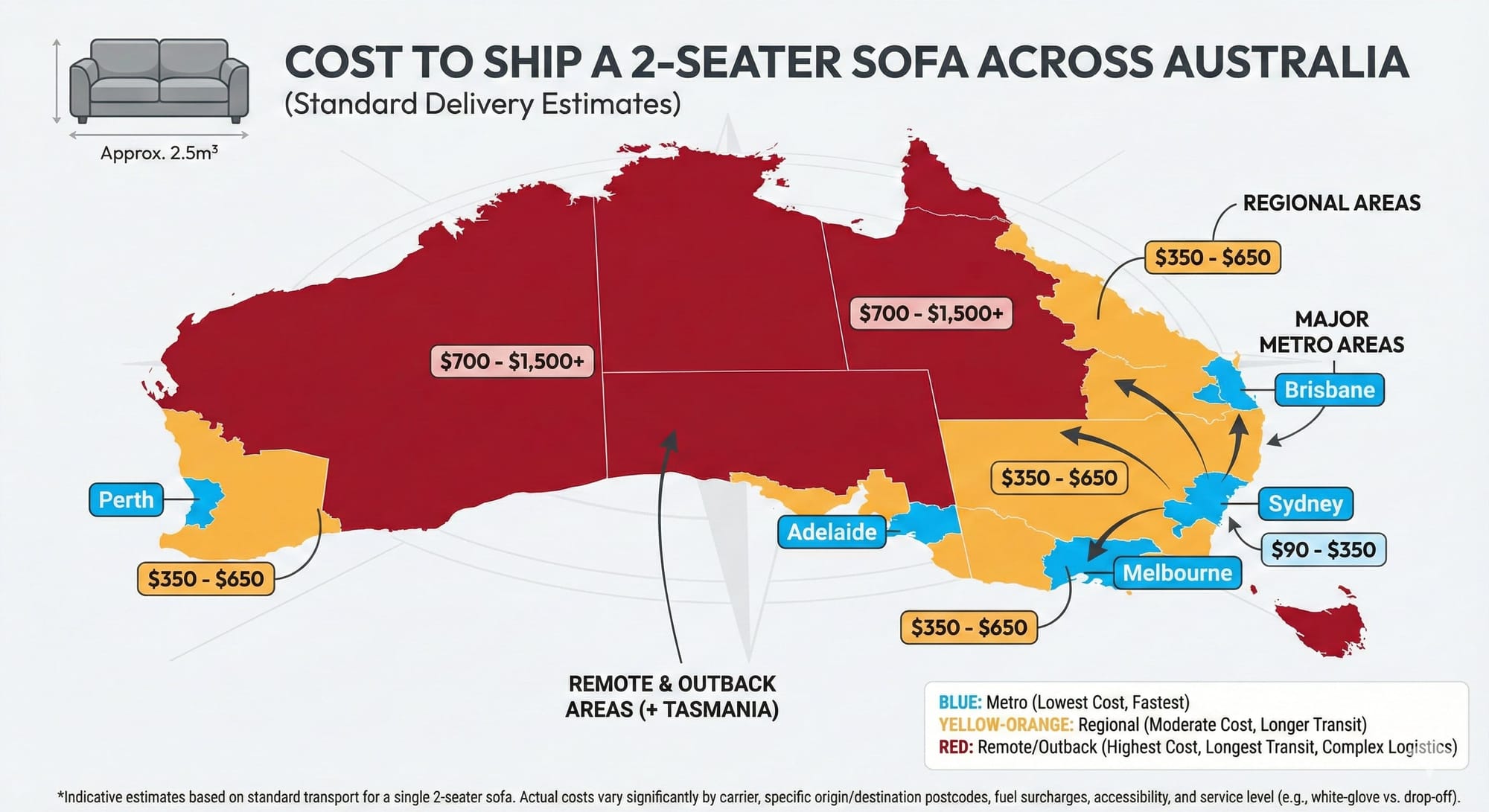
For large-item retailers, the problem is compounded by Australia's geography. Shipping a sofa from Sydney to Perth costs 5x more than shipping it across Sydney. Customers discover this at checkout, after investing 20 minutes browsing, and they're gone.
Real-Time Shipping Estimates: Reducing Cart Abandonment for Australian Furniture Stores
This article shows you how to implement a WooCommerce REST API endpoint that calculates real shipping estimates on product pages, why the "synthetic cart" approach fails, and what actually works in production.
How to Know You Have a Shipping Cost Problem?
Before implementing any solution, confirm shipping transparency is actually your issue.
Here's what to look for:
Customer Service Patterns:
- Repetitive "What's the shipping cost?" emails before purchase
- "I didn't know shipping would be that much" refund requests
- Abandonment emails mentioning "too expensive to ship"
- Support tickets asking for shipping quotes before adding to cart
Analytics Red Flags:
- High product page engagement (2-3 min average time) but low add-to-cart rate
- Normal cart page views → checkout initiation, but massive drop-off at checkout
- Funnel visualization showing 40%+ abandonment specifically between cart and checkout completion
- High cart page exit rate combined with low checkout completion
The Specific Pattern for Large Items: If you sell furniture or bulky goods, watch for:
- Different abandonment rates by region (Perth/Darwin higher than Sydney/Melbourne)
- Cart value clustering just below your free shipping threshold
- Customers adding multiple items, then removing all but one (testing total cost)
Quantifying the Impact: Use this formula:
Monthly traffic × cart adds × (current abandonment % - industry average 70%) × average order value = recoverable revenue
Example: 10,000 visitors × 5% add-to-cart × (85% abandonment - 70%) × $650 = $48,750 monthly recoverable revenue
If your abandonment rate sits above 80% and you're not showing shipping estimates before checkout, you've found your problem.
Why Australian Geography Makes This Worse?
Shipping a 2-seater sofa costs:
- Sydney to Sydney: $60-$120 next-day delivery
- Sydney to Perth: $300-$600 standard delivery
- Sydney to Darwin: $450-$800+ (often requires freight quote)
For large items like furniture, carriers use dimensional weight pricing—whichever is greater between actual weight or (length × height × width ÷ rate factor). A lightweight but bulky armchair can cost more to ship than a heavy but compact item.
According to Australian freight data, smaller homewares parcels range $10-$100 AUD, while larger furniture items cost $150-$500+ depending on distance. Regional and remote areas can double these rates.
The Real Problem: A customer in Melbourne sees your $899 dining table. They spend 15 minutes comparing it to competitors, reading reviews, measuring their space. They add it to cart. At checkout, they discover shipping is $380 because they live in regional Victoria. They close the tab.
You've lost the sale, not because your product wasn't right, but because you surprised them with a cost that represented 42% of the product price at the worst possible moment.
64% of shoppers expect to see shipping costs on the product page, but most ecommerce stores only show it at checkout. This timing mismatch is killing your conversion rate.
Why Standard WooCommerce Shipping Falls Short?
WooCommerce, just like Shopify, calculates shipping at cart/checkout—after customers have mentally committed to buying. This creates three problems.
Timing: Product page → cart → checkout is when shipping appears. By checkout, customers have invested 10-20 minutes. Discovering a $300 shipping cost at this stage feels like a bait-and-switch, even when it's not intentional.
Technical Limitation: Creating shipping estimates outside the cart flow isn't straightforward. WooCommerce's shipping system depends on cart sessions, customer objects, and frontend functions. Most tutorials suggest creating a "synthetic cart," but this approach fails because:
- It mutates the user's actual cart if they have one
- Cart hash validation breaks without proper session initialization
- Frontend dependencies aren't loaded in REST API context
Rate Accuracy: For large items, you need real carrier rates based on dimensional weight, zones, and current pricing. Manually maintaining shipping tables is impossible when:
- Carriers change rates quarterly
- Dimensional weight calculations vary by carrier
- Regional surcharges apply inconsistently
The solution requires direct integration with WooCommerce's shipping calculation engine, not creating a cart, but building a package that WooCommerce's existing methods can process.
The Working Solution - Stateless Shipping Calculation
WooCommerce's shipping system works with "packages"—arrays containing product data, quantities, and destinations. WC_Shipping::instance()->calculate_shipping_for_package() accepts a package directly.
Here's the complete, production-ready implementation:
<?php
// Shipping estimate REST API
add_action('rest_api_init', function () {
    register_rest_route('cc/v1', '/shipping/estimate', array(
        'methods' => 'POST',
        'callback' => 'cc_shipping_estimate',
        'permission_callback' => '__return_true',
    ));
});

function cc_shipping_estimate(WP_REST_Request $request)
{
    $data = $request->get_json_params();
    $product_id = isset($data['product_id']) ? absint($data['product_id']) : 0;
    $quantity = isset($data['quantity']) ? max(1, intval($data['quantity'])) : 1;
    $postcode = isset($data['postcode']) ? preg_replace('/\D/', '', $data['postcode']) : '';

    if (!$product_id) {
        return new WP_REST_Response(['message' => 'Invalid product_id.'], 400);
    }

    if (strlen($postcode) !== 4) {
        return new WP_REST_Response(['message' => 'Invalid postcode.'], 400);
    }

    $product = wc_get_product($product_id);
    if (!$product) {
        return new WP_REST_Response(['message' => 'Product not found.'], 404);
    }

    // Initialize session if needed (doesn't create or mutate cart)
    if (is_null(WC()->session)) {
        $session_class = apply_filters('woocommerce_session_handler', 'WC_Session_Handler');
        WC()->session  = new $session_class();
        WC()->session->init();
    }

    // Build package array - this is the key
    $package = [
        'contents' => [
            md5($product_id) => [
                'product_id' => $product_id,
                'quantity'   => $quantity,
                'data'       => $product,
            ]
        ],
        'contents_cost'   => $product->get_price() * $quantity,
        'applied_coupons' => [],
        'destination'     => [
            'country'   => 'AU',
            'state'     => '',
            'postcode'  => $postcode,
            'city'      => '',
            'address'   => '',
            'address_2' => '',
        ],
        'user' => [
            'ID' => 0, // Guest user
        ],
    ];

    // This core method finds matching zone and calculates rates
    $shipping_manager = WC_Shipping::instance();
    $packages = $shipping_manager->calculate_shipping_for_package($package);
    $rates = isset($packages['rates']) ? $packages['rates'] : [];

    // Find minimum cost, excluding local pickup and quote-required methods
    $min_cost = null;
    $min_rate_label = null;
    $pickup_available = false;
    $quote_required = false;

    foreach ($rates as $rate) {
        $label = $rate->get_label();
        $label_lower = strtolower($label);

        // Skip local pickup (free option, not shipping)
        if (strpos($label_lower, 'local pickup') !== false || strpos($label_lower, 'pickup') !== false) {
            $pickup_available = true;
            continue;
        }

        $cost = floatval($rate->get_cost());
        $taxes = $rate->get_taxes();
        $tax_total = is_array($taxes) ? array_sum($taxes) : 0;
        $gross_cost = $cost + $tax_total;

        // Skip zero-cost placeholders
        if ($gross_cost <= 0) {
            continue;
        }

        if ($min_cost === null || $gross_cost < $min_cost) {
            $min_cost = $gross_cost;
            $min_rate_label = $label;
        }
    }

    // Return costs in cents (avoids JavaScript floating-point issues)
    $min_cost_cents = $min_cost !== null ? round($min_cost * 100) : null;

    // Output can be adjusted to your UI needs
    return new WP_REST_Response([
        'min_cost_cents' => $min_cost_cents,
        'min_cost' => $min_cost,
        'min_rate_label' => $min_rate_label,
        'rates_count' => count($rates),
        'pickup_available' => $pickup_available,
        'quote_required' => $quote_required,
    ], 200);
}
Why this works:
- No cart creation—just a package array
- Session initialized only if needed
- Uses WooCommerce's native shipping calculation engine
- Returns multiple signals (pickup available, quote required) for better UX
- Cost in cents prevents JavaScript rounding errors
What happens behind the scenes:
calculate_shipping_for_package()matches the postcode to a shipping zone- Applies all shipping methods configured for that zone
- Calculates rates based on product weight, dimensions, and zone rules
- Returns array of available methods with costs
This approach respects all your existing WooCommerce shipping configuration—zones, methods, table rates, carrier integrations—without modification.
Frontend Integration
The API is useless without a clean interface. Here's a production-ready implementation:
async function calculateShipping(productId, quantity, postcode) {
    const response = await fetch('/wp-json/cc/v1/shipping/estimate', {
        method: 'POST',
        headers: {
            'Content-Type': 'application/json',
        },
        body: JSON.stringify({
            product_id: productId,
            quantity: quantity,
            postcode: postcode
        })
    });

    const data = await response.json();

    // Handle different scenarios
    if (data.quote_required) {
        return { type: 'quote', message: 'Freight quote required - Contact us' };
    }

    if (data.pickup_available && !data.min_cost) {
        return { type: 'pickup_only', message: 'Available for store pickup only' };
    }

    if (data.min_cost) {
        return {
            type: 'shipping',
            cost: data.min_cost,
            label: data.min_rate_label,
            pickup: data.pickup_available
        };
    }

    return { type: 'unavailable', message: 'Shipping not available to this area' };
}
UX considerations:
- Show loading state during API call (typically 0.5-1.5 seconds)
- Cache results by postcode to avoid repeated calls
- Auto-populate postcode from browser geolocation (with permission)
- Clear messaging for each scenario (quote required, pickup only, unavailable)
Handling Regional Variations
When shipping costs vary 5x between Sydney and Perth, you need strategies beyond just showing the price:
Progressive Disclosure: Don't show full shipping details until postcode entered. Start with:
- "Calculate shipping to your area"
- After entry: "$65 - Standard Shipping (5-7 days)" or "$180 - To your region (7-10 days)"
Zone-Based Free Shipping: Different thresholds prevent losing money on regional orders: php $metro_postcodes = ['2000', '3000', '4000', '5000']; // Sydney, Melbourne, Brisbane, Adelaide if (in_array(substr($postcode, 0, 1), ['2', '3']) && $cart_total > 500) { // Free metro shipping } elseif ($cart_total > 1200) { // Free regional shipping (higher threshold) }
Alternative Options for Remote Areas: When shipping to remote postcodes costs $400+:
- "Delivery to [4825] requires freight quote - [Request Quote Button]"
- "Available for pickup at [Brisbane, Sydney, Melbourne locations]"
- "Consider [alternative lighter product] with lower shipping costs"
What Breaks Shipping Calculators?
Inaccurate Product Data: Your API returns whatever WooCommerce calculates. If product weights are wrong, estimates are wrong. Common mistakes:
- Forgetting packaging weight (bubble wrap, box, filler adds 10-20%)
- Not updating dimensional weight when packaging changes
- Using placeholder weights from suppliers
- Missing weight data entirely (calculator shows $0 or errors)
Audit process: Weigh 10 random products with packaging. If estimates are off by more than 15%, your data is the problem, not the code.
Mobile Experience Failures: Mobile cart abandonment hits 77% vs 66% on desktop. Your calculator amplifies this if it:
- Requires typing 4 digits on small keyboards without proper input type
- Doesn't autofill from geolocation API
- Shows rates in a font size under 16px
- Has a calculate button that's hard to tap
Test on actual devices, not desktop browser dev tools.
API Failure Handling: Carrier APIs fail. Auspost goes down. Your package has logic errors. When the API returns no rates:
- Bad: White screen, JavaScript error, no messaging
- Good: "Unable to calculate shipping - [Contact us for quote]" with phone number
Cache common routes (Sydney→Melbourne, etc.) and show cached rates as estimates when live calculation fails.
Tax Calculation Errors: WooCommerce shipping tax settings are notoriously confusing. Common mistakes:
- Showing tax-exclusive price when your WooCommerce is configured for tax-inclusive display
- Not applying GST to shipping (it's taxable in Australia)
- Different tax treatment for metro vs regional (shouldn't happen but does)
Test with postcodes from each Australian state. If NSW shows $100 and QLD shows $109, you migth have a tax configuration problem.
When Professional CRO Makes Sense
If your cart abandonment stays above 70% after implementing shipping transparency, the problem isn't shipping—it's your broader conversion funnel. Clean Commit specializes in systematic A/B testing for ecommerce stores. We've increased conversion rates 57-86% for similar businesses by identifying the real friction points in your checkout process.
The Bottom Line
48% of shoppers abandon because of unexpected shipping costs. For large-item retailers in Australia where shipping varies $60-$600, hiding these costs until checkout is revenue suicide.
The solution isn't complex: WooCommerce's calculate_shipping_for_package() method accepts a package array without requiring a cart. Build the array, pass the postcode, return the rate. No synthetic carts, no session mutations, no hash validation errors.
Implementation takes 2-4 hours for a competent developer. The impact shows within weeks as support inquiries drop and cart abandonment improves.
Start with the code above. Test it on 20 postcodes across metro/regional/remote areas. Deploy it. Measure cart abandonment before and after. If you're not seeing at least a 10% improvement within 60 days, you've either got larger conversion problems or implementation bugs.
Resources:
- Clean Commit CRO Services - Systematic conversion optimization for ecommerce
- WooCommerce Shipping Docs - Official shipping setup
- Baymard Cart Abandonment Stats - Industry benchmarks


