 Talk to a human
Page builders are dead: why we take them out of every Shopify store

You can moan about AI taking jobs, but some jobs should never have existed in the first place. Dragging boxes around a page builder is one of them.
Page builders have been a nuisance in my life for more than a decade. When I started freelancing there were two kinds of freelancers. Developers who knew how to code (more or less) and wrote codebases by hand (can you imagine?), and "developers" who built everything in a page builder.
Nothing was worse than inheriting a site from the second kind. Usually it wasn't their fault, it's just how these tools were built. Some of those sites even looked nice.
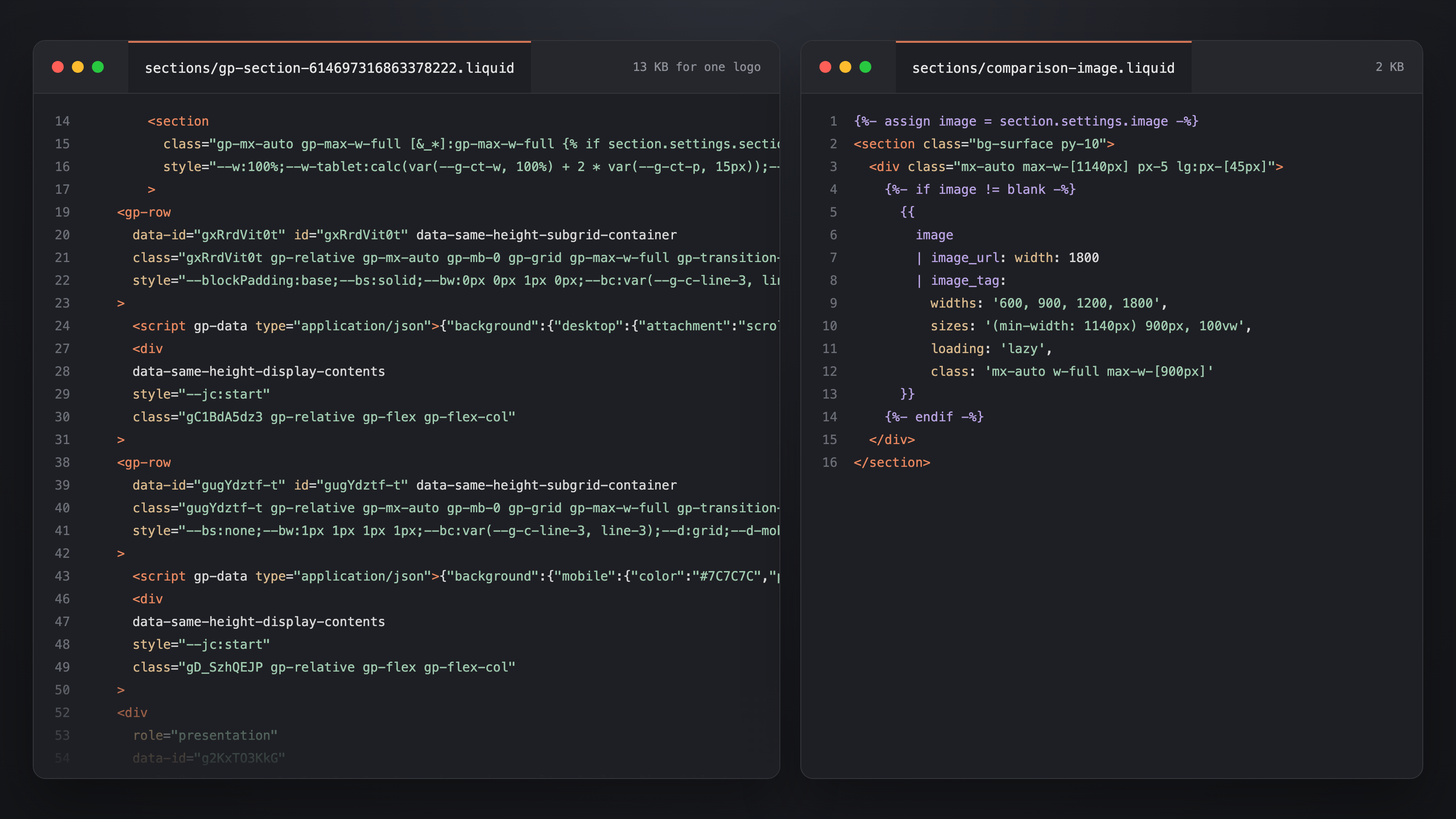
The magic disappeared when you opened the source code and found 24 nested divs holding up one headline, inline styles on everything and multiple scripts fighting over the same elements.
An unmaintainable nightmare, which often forced a full rewrite.
Page builders started on the desktop with Adobe Dreamweaver and Apple's iWeb, then moved from platform to platform. WordPress was particularly fond of them - Elementor, Divi and WPBakery each left their own mess in thousands of databases. Every platform with cost-conscious users nurtured some sort of page builder.
Webflow was the exception, and the only decent one of the lot. Probably because it's a visual code editor more than a page builder. Working with real HTML elements, classes and CSS properties with a panel instead of a text file made it a better setup.
Even so, I'm not sure it's worth considering today. AI gets you the results faster, better and in a more flexible way.
Shopify got PageFly, GemPages, Shogun and Replo. Since we focused fully on Shopify we've opened a lot of stores built with them, and we keep taking them out to make our job easier. This post covers why, what to use instead, and how to leave a page builder without breaking your store.
Why page builders don't make sense any more?
Before Online Store 2.0 arrived in 2021, a Shopify theme provided sections on the homepage and not much anywhere else. Every new landing page required a developer. Apps like PageFly solved a valid problem and enabled marketing teams to ship pages quickly.
There was a trade-off, though. With a page builder, your storefront got more bloated, complex and unmanageable over time.
Since then, a couple of things have changed:
- Online Store 2.0 put sections and blocks on every template. A marketer can build a page in the theme editor from sections a developer made once, and nested blocks give them even more room.
- AI-assisted development made custom sections cheap. A section that used to take a day takes an hour or two, review included.
- Theme-based A/B testing tools test sections and templates directly, so a native page is extremely easy to test.
Page builder trade-offs
With a page builder you trade maintainability for speed. GemPages is popular in a lot of the stores we audit, and the same problems come up every time:
- Spaghetti code. Deeply nested markup with generated classes that are hard to read or maintain.
- Random template names. Auto-named templates are hard to search, validate and organize.
- GemPages forced theme updates. It pushes every template stored in the app into the theme, even the ones you no longer need, so the theme keeps growing.
- Bloated JS and CSS. Lots of JS and CSS gets added that the page doesn't need, and some of it loads on pages with no builder content at all.
- Pages formatted by the app. Your pages live inside the app, in the app's format.
- Nearly impossible to A/B test. Injecting content tests is extremely fragile because of the forced app updates, leaving template tests as the only option, which costs velocity.
Why brands are moving off page builders, and you should too
Every one of those trade-offs has a native answer. These are the four improvements brands notice first after the move.
Faster testing
GemPages pages and edits made in the builder are a pain to A/B test, and the biggest problem is that you can't easily run tests in parallel. Shopify renders one template per page, so two template tests on the same page collide. The way to run parallel A/B tests on Shopify is one template test with onsite edits on top. On a builder page those edits break every time the app pushes an update, so you're down to one test per page at a time.
Native sections keep their markup stable, so onsite edits hold, and the same page can carry several tests at once.
Quicker development
Building in a page builder means a person clicking through panels, dragging boxes and fixing spacing on every breakpoint, one page at a time. AI can't do much of that for you, because the page lives in the app's editor, in the app's format.
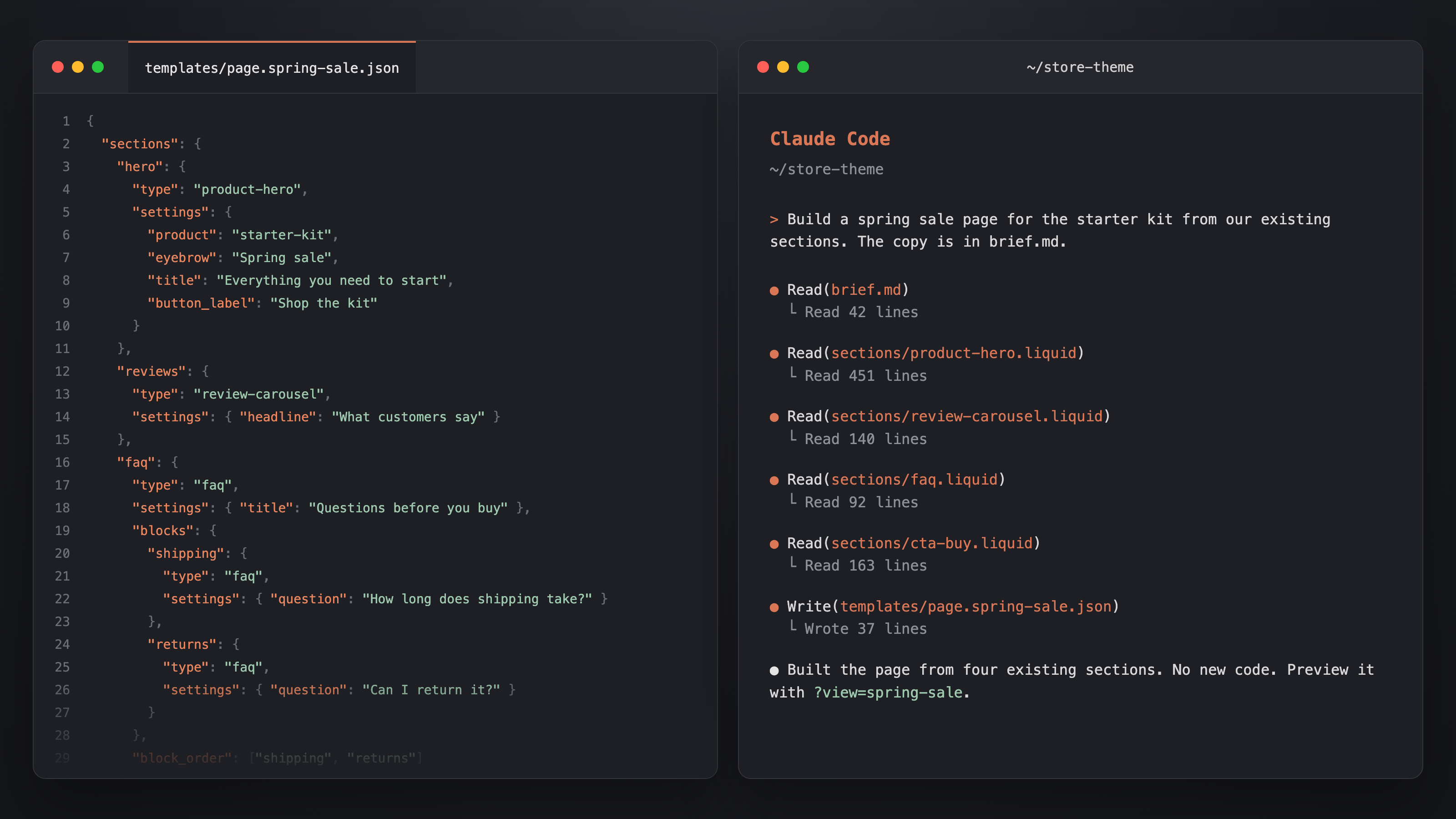
Native sections are code in a repo, and code is what AI models are good at. We describe the section, the model reads the theme's conventions (written down in skills and AGENTS.md) and writes the Liquid, the schema and the Tailwind classes. A developer reviews it, and from then on a marketer builds pages from it in the theme editor without anyone else involved.
Pages get easier too. A Shopify template is a JSON file that lists sections and their settings, and every section has a schema that says exactly which settings and blocks it accepts. An agent reads those schemas and builds a new page template from the sections you already have, with nobody clicking through an editor.
Stability, and an undo button
A builder keeps the history of a page in the app, if it keeps one at all. GemPages also pushes its templates into your theme on its own, so the theme changes without anyone on your team touching it. When a page breaks, you usually hear about it from a customer.
A native theme lives in a GitHub repo. Shopify's GitHub integration connects a branch to a theme, and every change goes through a pull request and a preview theme before it reaches the live store. If something still slips through, reverting the commit puts the old version back in a minute. You can always see who changed what, when and why.
Less bloat
Builders add their own JS and CSS to the store, and every page you build adds more. Native sections share one stylesheet, and with Tailwind it grows slowly because every section reuses the same utility classes.
The builder is rarely the only app doing this. Once you're writing native sections, a lot of features stores pay for monthly are easy to build into the theme. We move clients off Upcart and Rebuy onto a native cart drawer. Same with search: Shopify's native Search & Discovery app works great. It isn't JS heavy, which keeps the storefront fast and leaves us free to test the search UX. Every app you drop is one less script on every page and one less vendor that can break your theme with an update.
Our approach: native Liquid, Tailwind CSS and Alpine.js
We migrate client themes to native Liquid with Tailwind CSS for styling and Alpine.js for interactivity, written in TypeScript and bundled with Vite. Every section does one job, caps its blocks and ships with presets, so a marketer gets a good-looking page from the theme editor without breaking the design. I wrote up the whole setup, and how we got to it, in Shopify theme development with Vite, Tailwind and Alpine.js.
How to move off PageFly, GemPages or Replo
Whether the rebuild goes well is mostly decided before the first section exists. This is the order we work in:
- Set boundaries and standards. Write down how sections are built before anyone builds one, in AGENTS.md and your skills, so every developer and every agent follows the same rules. Ours, in short:
- One section, one content model. If reusing a section would need unrelated settings or a different block structure, it becomes a new section.
- Repeated items (slides, cards, FAQ items, logos) are blocks with a limit set by the layout, never
title_1andtitle_2settings. - No colour pickers or inline styles. Sections use the theme's Tailwind colour tokens, and a variant setting decides the layout instead of a dozen separate toggles.
- Settings that don't apply to the chosen variant stay hidden.
- Every section a marketer can add ships with presets.
- Shared details like social links and contact info live once in theme settings.
- Pick the stack. Liquid is a given, what goes on top isn't. Decide before the first section, because switching halfway means rewriting what you've already built. Ours is Tailwind CSS, Alpine.js, TypeScript and Vite, as above.
- Rebuild from screenshots, not source code. Take desktop and mobile screenshots of every live page and give those to the agent. Don't feed it the builder's code. GemPages markup pollutes the result, and the agent copies its nesting and generated classes into your new sections.
- Reuse sections and elements. Before building a section, check whether an existing one fits. Buttons, cards and headings live in snippets, so every section uses the same ones and the pages stay consistent. Most builder pages turn out to be the same handful of section types with different content. On our last GemPages migration, all the landing pages came down to 20 sections.
- Review by hand, then fix with AI. Open each rebuilt page on a preview theme next to its screenshot, on desktop and mobile, and list everything that's off. Hand the list to the agent for a round of fixes, then review again.
Once the pages are rebuilt, keep the URLs (assign the new templates to the same pages and redirect anything that changes), uninstall the app and clean up after it. On one store GemPages kept pushing its files into the theme, so we added a GitHub Action that deletes them whenever they land on main. Then start testing the new pages.
Is a page builder ever the right call?
No. Stop using them. That's my personal opinion, and I've had more than a decade to form it.
The usual arguments for keeping one don't hold up any more:
- "We don't have a developer." You need one once, to build the sections. After that the theme editor is your page builder.
- "We ship lots of campaign pages." That's the best case for reusable sections. A campaign page built from tested sections takes minutes, and it doesn't leave an orphaned template behind when the campaign ends.
- "We're too small to pay for development." The app fee comes every month, forever. A handful of sections is a one-off cost, and AI made them cheaper than ever.
What's the best Shopify page builder? The theme editor you already have
If you came here looking for the best Shopify page builder, my answer is the one already in your admin. The Online Store 2.0 theme editor, with sections built for your store, does what page builder apps like PageFly, GemPages and Replo do without the app fee, the extra code or the lock-in. If you're on a builder and can't move yet, at least find out what happens to your pages when you uninstall it, so you know what leaving will cost.
Ready to drop the page builder?
If your store runs on PageFly, GemPages, Shogun or Replo and every change takes longer than it should, we do these migrations: an audit of the builder pages, reusable native sections, and the move without losing URLs or rankings. Book a free strategy call or see how we approach Shopify development.