 Talk to a human
Invoice Templates for Shopify - Send Personalized Invoices in Two Clicks

If your team sends draft order invoices in Shopify, you know the drill. Open the draft order, click Send invoice, and type the same custom message you typed yesterday. And the day before. There is no way to save that message, no personalization variables, and no record of what you actually sent.
For stores that run on draft orders, this is a real operational tax. Merchants have been asking for default custom messages in draft order invoices since at least 2023, and Shopify still doesn't offer them.
We hit this exact wall with one of our clients, a store selling personalized treatments where staff create dozens of draft orders daily. Each treatment type needs different instructions in the invoice email.
So we built a solution: reusable invoice templates with click-to-insert variables, sent directly from the draft order page.
The Core Problem
Draft orders are Shopify's answer to phone orders, B2B quotes, and any sale that starts outside the online checkout. When the order is ready, staff send an invoice email containing a secure payment link.
That email supports exactly one customization at send time: a free-text "custom message" box. This creates three problems:
- No templates. Staff retype or copy-paste the same message for every order. With multiple message variants (new orders, amended orders, follow-ups), people inevitably paste the wrong one or forget to swap a placeholder.
- No personalization variables. You can't write "Hi {{ FirstName }}" and have Shopify fill it in. Either staff manually type the customer's name into every message, or customers get a generic greeting.
- No send history. Once the invoice goes out, the custom message is gone. If a customer disputes what they were told, there's nothing to check.
You can edit the store-wide draft order invoice notification template with Liquid, but that changes the email layout for every draft order. It doesn't help when different orders need different messages, and it puts email copy in the hands of whoever is comfortable editing Liquid. For most teams, that's nobody.
Our client's case made the gap obvious. They sell personalized treatments, and many treatments carry recurring instructions that must appear in the invoice email. Staff were maintaining message snippets in a shared doc and pasting them into Shopify by hand. It was slow, error-prone, and impossible to audit.
What We Built
We extended their custom Shopify app with an invoice templates feature. The workflow now looks like this:
- Create a reusable template once: a name, a subject line, and a message with
{{ Variable }}placeholders. - On any draft order, use Send invoice template from actions menu.
- Pick a template. Customer name, email, order number, and the payment link fill in automatically.
- Review the final email, then send.
- Every send is logged with a full email preview.
No Liquid, no code, no copy-pasting. A new template takes about a minute to set up, and sending a personalized invoice takes two clicks.
How It Works
Template management with a variable picker
Templates live in a dedicated section of the app, built with Shopify Polaris so it feels native to the admin.
A template is deliberately simple: name, subject, and message body. Both the subject and body support variables. Available variables appear as clickable badges with tooltips. Click one and it drops into whichever field you're editing, with syntax highlighting so placeholders stand out from regular text.
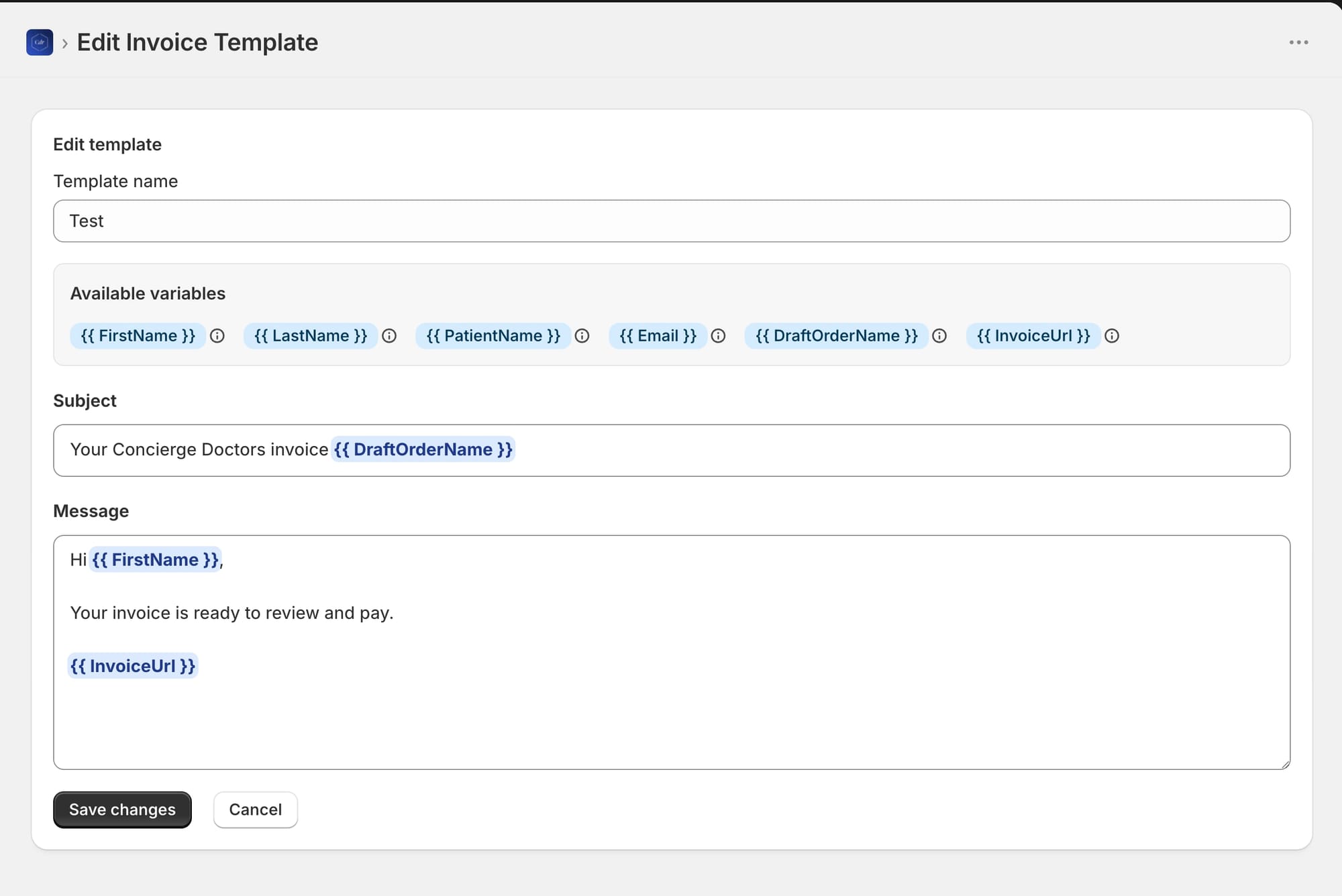
Validation runs as you type. If someone enters a variable that doesn't exist (usually a typo), a warning banner lists the offending placeholder and the save button is disabled. You can't save a broken template, which means staff can't send a broken email.
Templates are archived rather than deleted, so the history stays intact even when a message is retired.
Sending from the draft order page
This is where Shopify Admin UI extensions come in. The extension targets admin.draft-order-details.action.render, which adds a Send invoice template action to the Actions menu on every draft order details page.
[[extensions.targeting]]
module = "./src/ActionExtension.tsx"
target = "admin.draft-order-details.action.render"
Clicking the action opens a modal that:
- Loads the shop's active templates and the draft order's customer details from the app backend.
- Renders the selected template's subject and message instantly with the customer's real values.
- Lets staff adjust the recipient, add BCC recipients, tweak the copy, or override individual variable values with an optional "Modify template fields" toggle.
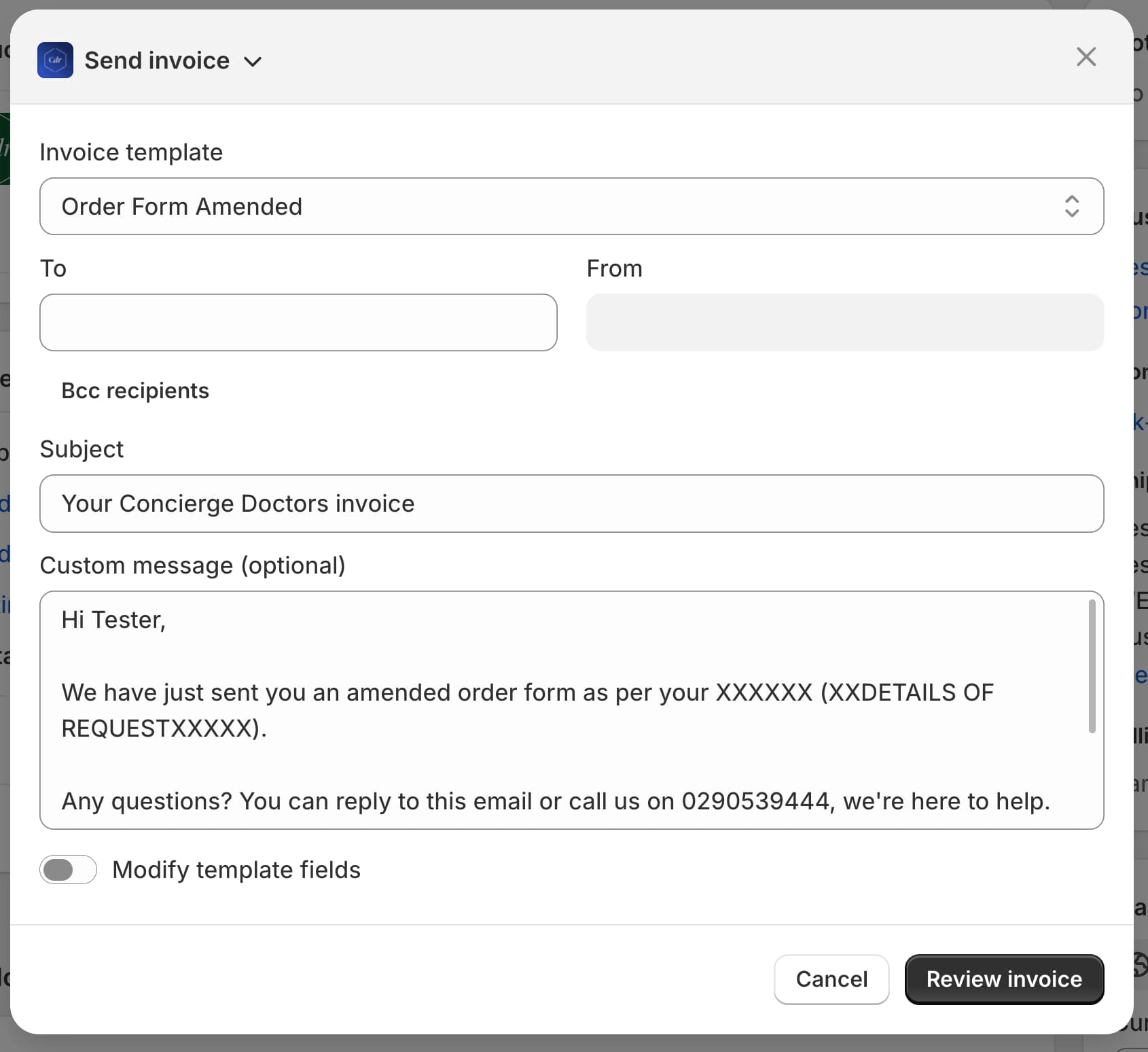
The defaults do the work. The recipient pre-fills from the draft order's customer, the From address comes from the store contact email, and all six variables resolve automatically. In the common case, staff pick a template and move straight to review.
Review before send
We added a deliberate two-step flow: Review invoice, then Send invoice.
The review step calls Shopify's draftOrderInvoicePreview mutation to generate the exact email Shopify will send, then shows the final From, To, Subject, and message content. Only after reviewing does the send button appear.
Sending calls draftOrderInvoiceSend:
mutation draftOrderInvoiceSend($id: ID!, $email: EmailInput) {
  draftOrderInvoiceSend(id: $id, email: $email) {
    draftOrder {
      id
      status
    }
    userErrors {
      field
      message
    }
  }
}
This detail matters more than it looks. Because Shopify itself sends the email, the invoice uses the store's standard email infrastructure: the store's From address, the branded invoice layout, and the working payment button. The template's rendered message is injected as the custom message inside Shopify's own invoice email. We get personalization without rebuilding (or risking) deliverability.
A full audit trail
Every send is logged: template used, recipient, subject, final message, BCC list, invoice URL, timestamp, and the complete rendered email preview.
A Sent invoices page in the app lists the history with date filtering, and each entry expands to show the email exactly as the customer received it.
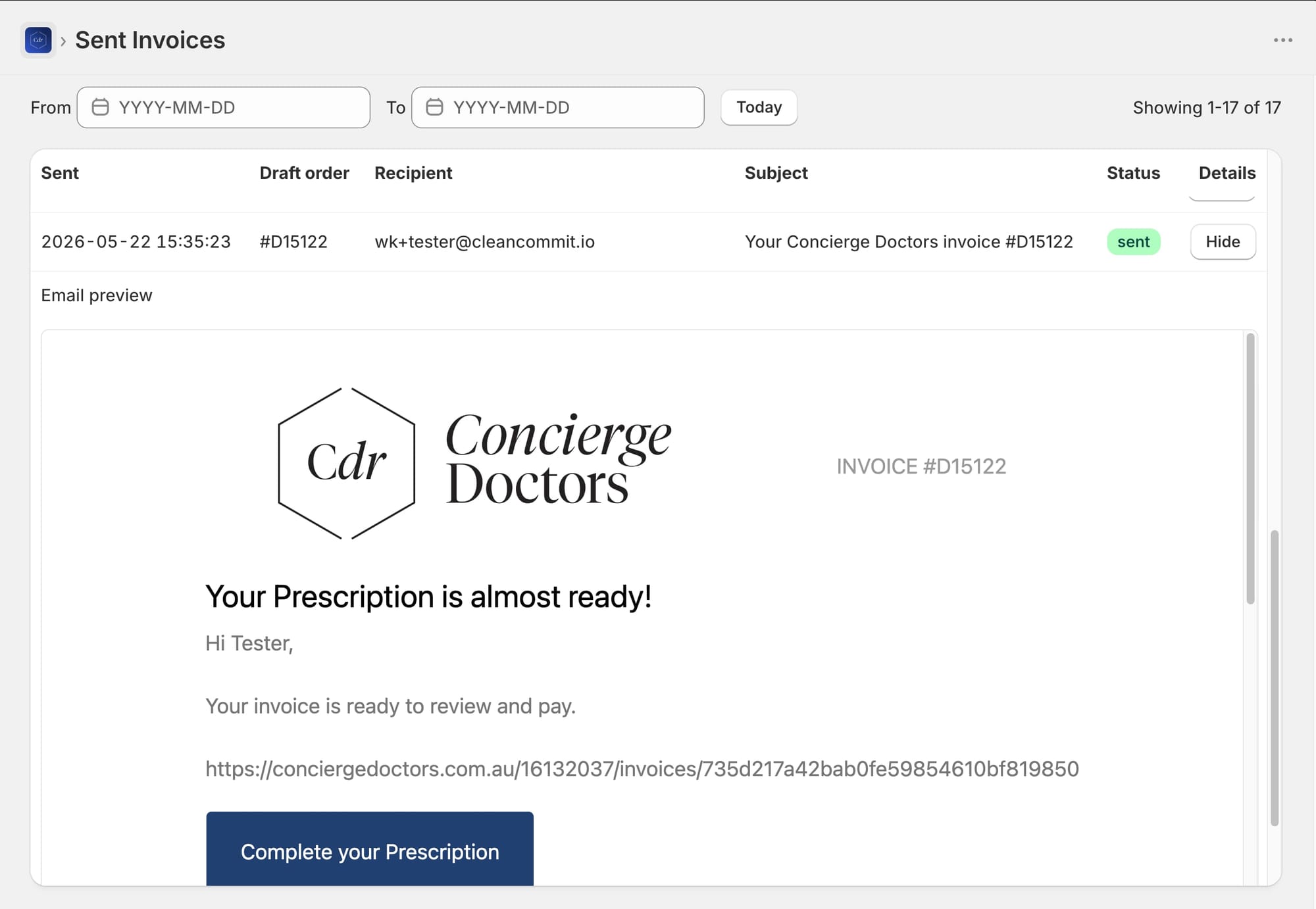
For a business sending order-specific instructions, this log isn't a nice-to-have. When a customer calls asking about their order, support can pull up the exact email in seconds.
The Sandbox Constraint Worth Knowing About
One implementation detail will save you time if you're building something similar: Admin UI extensions cannot render iframes or arbitrary HTML.
Extensions run in a sandboxed environment that only permits Shopify's own UI components. That's great for security and consistency, but it means the review step inside the modal cannot display the styled HTML email as the customer will see it. We strip the preview HTML returned by draftOrderInvoicePreview down to plain-text paragraphs for the in-modal review.
The full rendered preview lives on the app's Sent invoices page instead. That page is a regular embedded app page, not an extension, so iframes work fine there.
If you've worked with Shopify's extension surfaces before, this pattern will feel familiar.
We ran into a similar set of sandbox trade-offs when fixing Shopify's "Buy Again" button to preserve line item properties, where Customer Account UI extensions blocked window access and forced an API-first approach. The lesson is the same both times: design around the sandbox from day one, and put rich functionality in the embedded app where the extension can't deliver it.
Why This Approach Works
It meets staff where they work. The action lives on the draft order page itself. Nobody opens a separate app, copies an order number, or switches tabs mid-task. Removing steps from a repeated daily workflow compounds fast; the same logic that drives customer experience optimization for shoppers applies to the staff operating your store.
Shopify handles delivery. By building on draftOrderInvoiceSend instead of a third-party email service, invoices keep the store's branding, sender reputation, and payment link behavior. There's no second email system to configure or monitor.
Guardrails over training. Variable validation, pre-filled recipients, and the mandatory review step mean a new staff member can send correct invoices on day one. The system prevents the mistakes instead of relying on people to avoid them.
The audit trail closes the loop. Logging every send turned an untraceable process into one support can verify in seconds.
Honest Limitations
A few constraints to be aware of, mostly inherited from Shopify's platform:
- The full visual preview is only available after sending. The in-modal review shows message content as text, not a pixel-perfect rendering (the sandbox limitation above).
- Templates are subject plus text message. The message slots into Shopify's standard invoice email layout, which already carries the store branding and payment button. Custom HTML email designs are a different problem.
- No bulk sending. The action lives on the order details page and sending works one draft order at a time.
- The draft order needs a customer email, and the store contact email must be set in Shopify admin (it's used as the From address).
None of these affected the core goal: making the everyday invoice send fast, personalized, and traceable.
When You Need More Than Shopify Gives You
Shopify's defaults cover the 80% case well. The remaining 20% is where stores differentiate, and it usually requires a custom app: a missing workflow, a broken native feature, or an operational process Shopify never anticipated.
The pattern we follow is consistent. Identify the exact friction, check whether Shopify's APIs expose the right primitives (they usually do; draftOrderInvoiceSend existed all along), and build the thinnest possible layer that connects them to your team's workflow.
If a Shopify limitation is costing your team hours every week, we can probably fix it. Take a look at our Shopify app development services or book a free strategy call to talk through your workflow.
FAQ
Can you customize the draft order invoice email in Shopify?
Natively, only in limited ways. You can edit the store-wide notification template with Liquid, which changes the layout for all draft orders, and you can type a one-off custom message at send time. Shopify offers no saved templates or per-send personalization variables. A custom app can add both.
Does Shopify save the custom message sent with a draft order invoice?
No. Once the invoice is sent, the custom message isn't viewable anywhere in Shopify admin. Our implementation logs every send, including the full rendered email, in the app's Sent invoices page.
What is the draftOrderInvoiceSend mutation?
It's the GraphQL Admin API mutation that sends Shopify's invoice email for a draft order. It accepts an email argument for customizing the recipient, subject, message, and BCC list, and the email includes the secure checkout link for payment.
Can Shopify Admin UI extensions show HTML email previews?
No. Admin UI extensions run in a sandbox that only allows Shopify's UI components, so iframes and arbitrary HTML are blocked. Rich previews need to live on a regular embedded app page instead.